
Everyday progressives
Best for changing locations and distances throughout the day. Most convenient, but the monitor zone may feel narrow.
Eyewear Advice · Screen Comfort
Everyday progressives give one pair the widest range of distances. Computer lenses give the desk more space. The right choice depends on whether you value all-day convenience or sustained comfort across your monitor and workspace.
The Short Answer
General progressives blend far distance, intermediate, and near so you can drive, walk, converse, use a screen, and read without changing pairs. That versatility requires each distance to share the lens.
Computer and occupational lenses intentionally reduce far-distance range so the monitor, keyboard, phone, and paperwork can occupy wider, easier-to-find zones.
Side-by-Side
Best for changing locations and distances throughout the day. Most convenient, but the monitor zone may feel narrow.
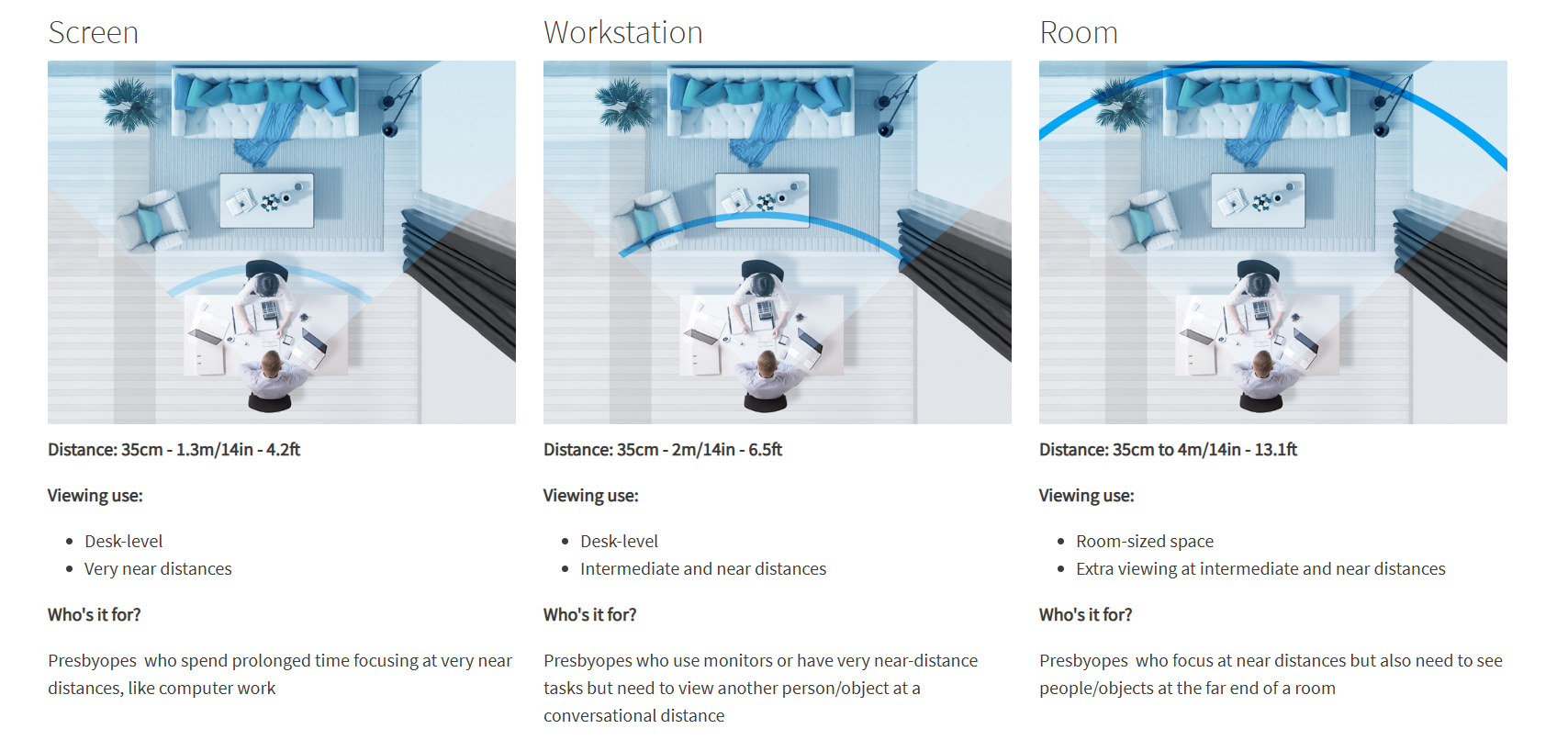
Widest simple field at one selected screen distance. Less useful when you must see near print and across the room.
Broad desk and monitor area for concentrated work, with intentionally limited far vision.
Extends toward coworkers or a meeting room while retaining more desk area than a general progressive.
Why Posture Changes
If the everyday progressive's intermediate zone is too low or narrow for the monitor, you may lift your chin, lean forward, or turn your head across a wide screen. A work-specific design can move more useful power into the area used at the desk.
Screen height and distance still matter. No lens design can fully compensate for a monitor placed far above a natural line of sight.
The Two-Pair Strategy
Many progressive wearers keep their everyday pair for driving, walking, shopping, and changing environments, then switch to an occupational pair at the desk.
The second pair is not a failure of the progressive. It is the visual equivalent of using the right tool for a specialized job.
Safety Reminder
Many occupational designs intentionally blur far distance. Confirm the intended range of the specific lens and switch to appropriate distance eyewear before driving.
Related Guides
Computer Lens FAQ
Everyday progressives provide distance, intermediate, and near vision in one pair. Computer glasses intentionally prioritize one screen distance or a near-to-room working range, creating more usable space for desk tasks but less far-distance vision.
Some are. A single-vision computer lens is set for one primary working distance. Occupational lenses are progressive-style designs that combine broad near and intermediate areas with a limited farther range.
They can be worn throughout a desk-based workday, but many should not be used for driving or tasks requiring clear far distance. Follow the instructions for the specific design.
They devote more lens area to fewer distances. By giving up some far-distance range, the design can make the monitor and desk zones broader.
Many people use everyday progressives for general life and a second occupational pair for sustained computer work. The two pairs solve different visual problems.