
The monitor is too high
A high screen can force you to raise your chin to reach the intermediate zone, creating blur and neck strain.
Eyewear Advice · Screen Comfort
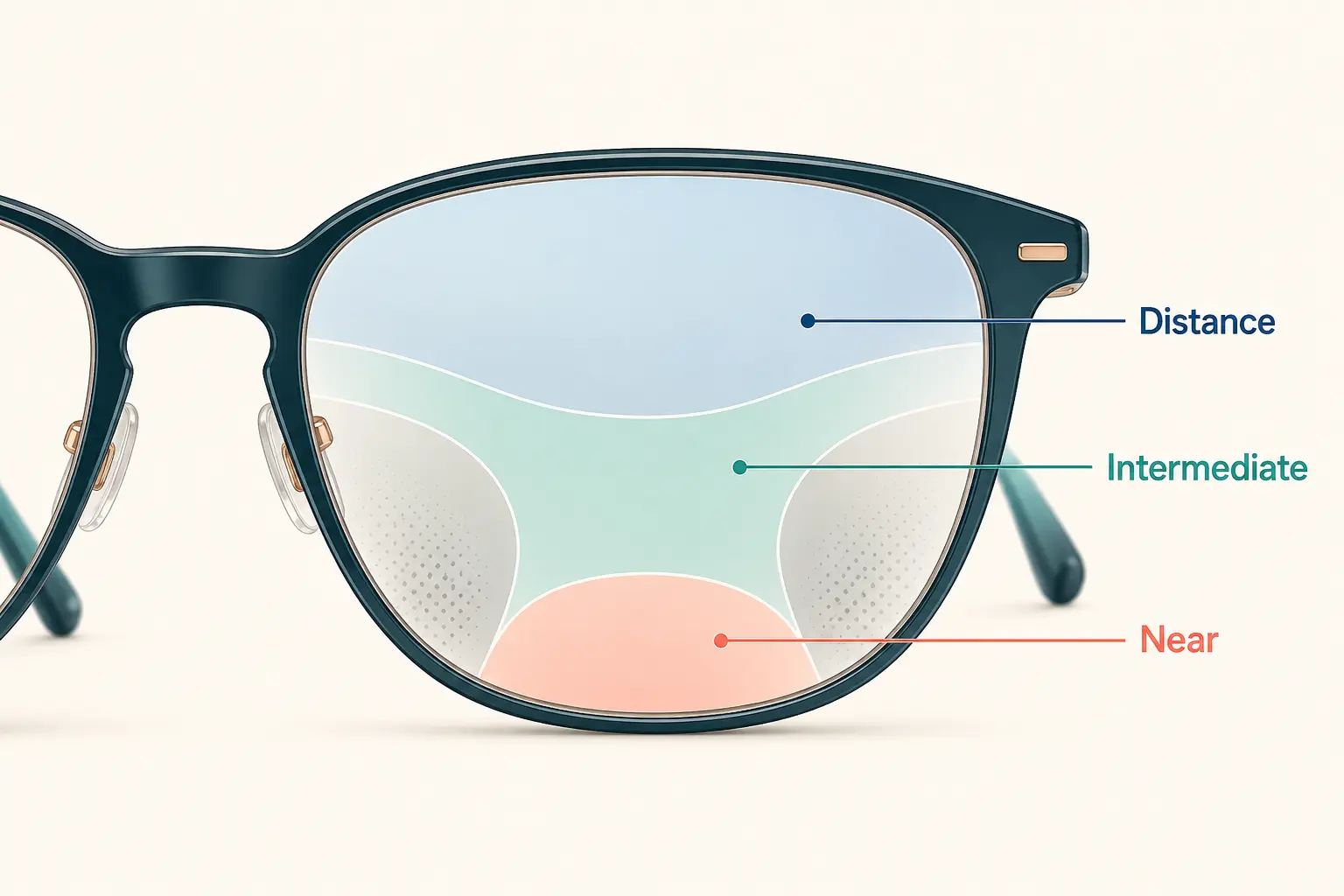
A desktop monitor usually sits at an intermediate distance—the part of a general-purpose progressive that often has the least horizontal room. Screen height, working distance, frame position, and lens design can make that usable area feel even smaller.
The Short Answer
A general-purpose progressive blends distance vision at the top, intermediate vision through the middle, and near vision toward the bottom. That gives one pair useful range, but it does not give every distance an equally wide field.
A desktop monitor is commonly viewed through the intermediate portion. If that zone is narrow or poorly aligned with the screen, you may lift your chin, move your head side to side, lean toward the monitor, or lose clarity around the edges.
Six Common Reasons
A high screen can force you to raise your chin to reach the intermediate zone, creating blur and neck strain.
A screen that is farther away or closer than expected may require a different part of the lens—or a different prescription strategy.
Wide spreadsheets, two monitors, and side-by-side windows may extend beyond the clearest intermediate corridor.
Sliding, tilt changes, or an altered adjustment can move the progressive zones away from where they were measured.
A change in distance power, near addition, focusing ability, or binocular vision can become noticeable during sustained screen work.
Reduced blinking, glare, long sessions, and an unstable tear film can cause fluctuating blur even when the lens is correct.
Start With the Workstation
Center the primary monitor and place its top near or slightly below eye level. Adjust the distance until the screen is clear without leaning forward, raising the chin, or tipping the head back. Enlarge text instead of moving the entire monitor too close.
For two monitors, place the one used most directly ahead. If both are used equally, bring them closer together and expect more head movement than with a single centered screen.
A Useful Self-Check
If you must lift your chin, lean forward, or sweep your head across each line, the screen and intermediate zone are not working together naturally. Note the exact screen distance and height before your next optical visit.
When Everyday Progressives Are Not Enough
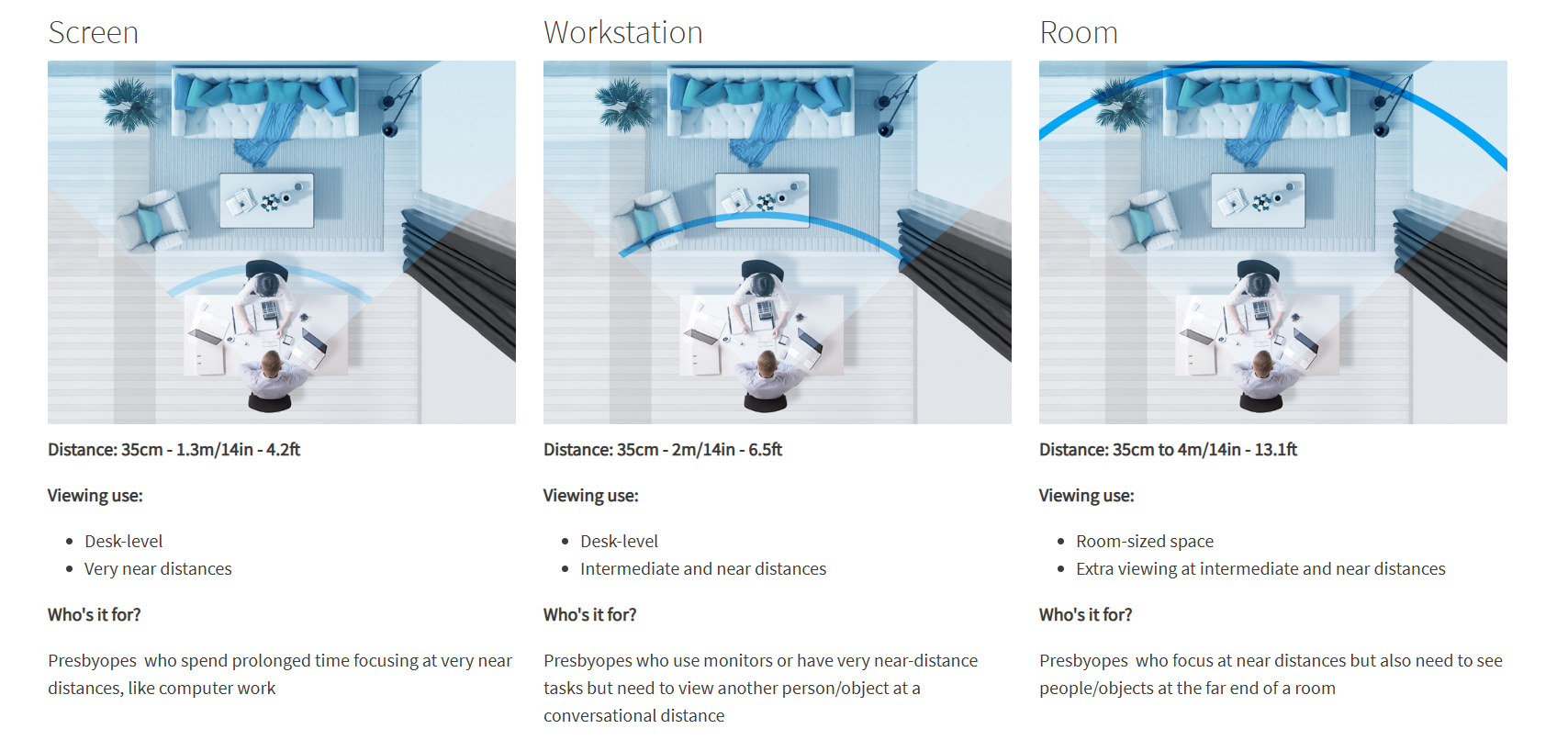
A single-vision computer lens can be set for one primary monitor distance. An occupational or office lens can provide broader intermediate and near zones for the monitor, keyboard, paperwork, and nearby room—depending on the design selected.
These lenses are purpose-built tools, not necessarily all-day replacements for general progressives. Some do not provide the distance vision required for driving or walking through larger spaces.
What to Bring to the Appointment
Record the distance from your eyes to the main monitor, the screen's height relative to your eyes, the number and arrangement of monitors, the hours you work, and whether you need to see people or presentations across the room.
A photo of you seated normally at the workstation can reveal posture and placement that are difficult to describe.
Related: choosing frames for progressive lenses →When to Have It Checked
Ask for an evaluation if the blur is new, affects one eye more than the other, changes significantly through the day, occurs at other distances, or comes with headaches, double vision, eye pain, light sensitivity, flashes, or new floaters.
The solution may involve the prescription, lens measurements, frame adjustment, dry-eye care, binocular vision, workstation ergonomics, or a different lens design.
Progressives & Computer FAQ
A desktop monitor usually sits at an intermediate distance. In a general-purpose progressive, the intermediate zone is narrower than the distance and near areas and may not align naturally with the height or distance of your screen.
The useful computer area is usually below the distance zone and above the reading zone. If the monitor is too high, too far away, or unusually close, you may struggle to place the screen inside that area.
Often. Lowering the monitor so its top is near or slightly below eye level, adjusting the distance, enlarging text, and centering your primary work can reduce awkward head and neck positions.
For long computer sessions, a dedicated single-vision computer prescription or an occupational lens can provide a wider field at desk distances. The best option depends on the monitor distance, desk tasks, room distances, and prescription.
Many occupational designs intentionally limit clear distance vision and are not intended for driving. Follow the instructions for the specific lens and keep an appropriate distance pair available.
Yes, but it can also result from lens design, frame position, dry eye, screen placement, or a change in working distance. Persistent or new blur should be evaluated rather than assumed to be normal adaptation.